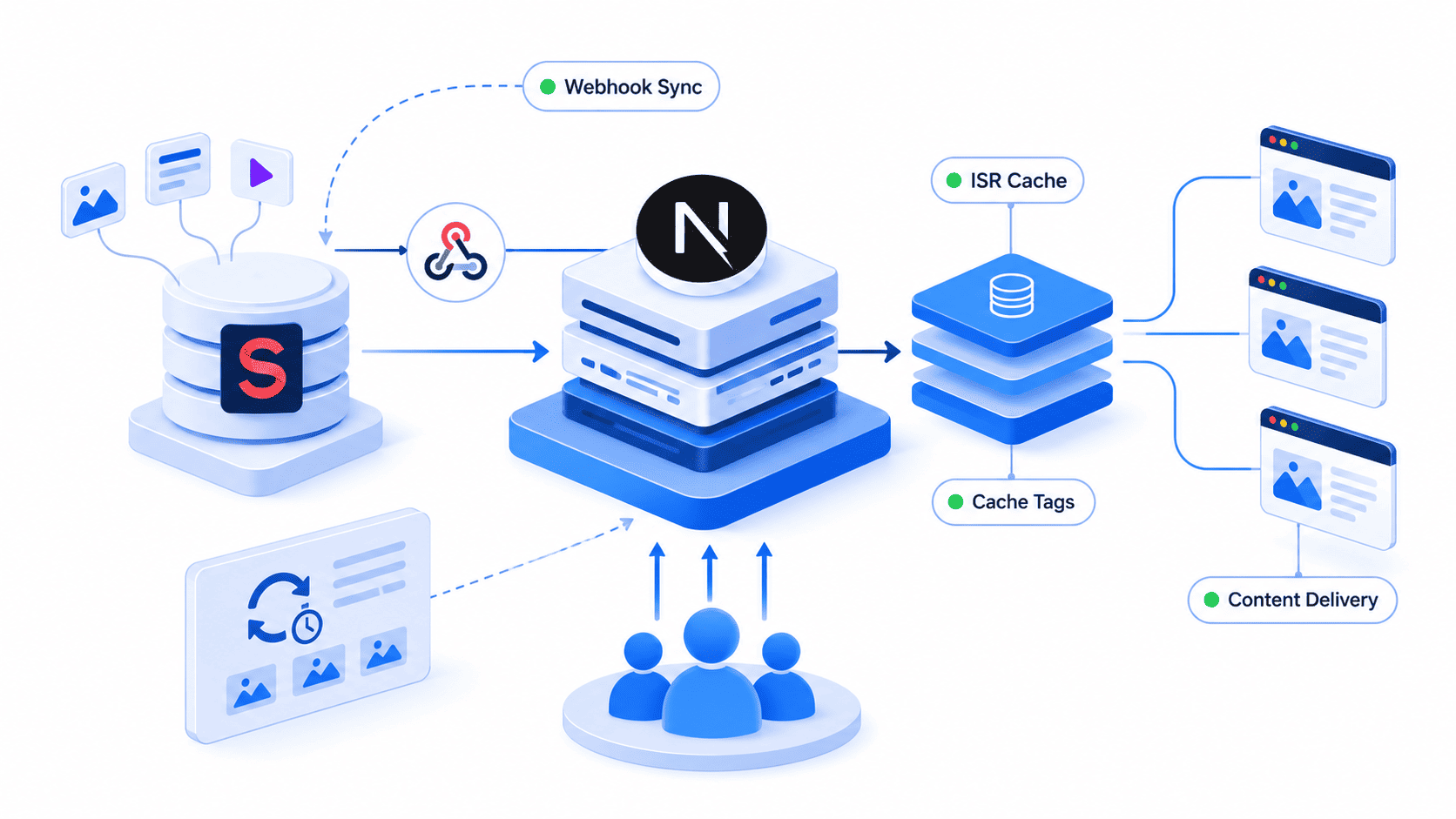
Most Sanity projects start the same way. The editor preview feels fast, so nobody checks how often the app calls the Content Lake. Then traffic grows, and every page view sends a fresh GROQ query. Pages slow down, and API usage climbs.
This guide shows how to fix that with Next.js caching with Sanity CMS. You will set up ISR, cache tags, and webhooks in a structure you can reuse. It also covers database logging, error handling, and a launch checklist. These patterns come from real builds, like the ones described under our full stack development services, where content and caching have to work together.
By the end, most visits will be served from cache. Sanity will only be called when content changes or when a safety timer runs out.
Why Uncached Sanity Queries Hurt Production Apps Since
Next.js 15, fetch calls are no longer cached by default. If you forget to add cache options, each request goes straight to Sanity. That works in development. It becomes a problem when real users arrive.
An uncached setup causes three issues. First, every visitor waits for a network round trip. Second, your API request count grows with traffic instead of with content changes. Third, a traffic spike turns into a spike of calls to your CMS, which you do not control.
The fix is a simple rule set. Cache every public query. Attach a tag to each one. Let a webhook clear only the tags that changed. Use a time limit as a backup, not as the main plan.
Project Structure for a Cache-Aware Sanity Setup
A clean structure keeps cache logic from spreading across your app. When TTL values and tag names live in one place, a change takes minutes instead of a long search.
Folder Layout for Next.js Caching with Sanity CMS
Each file in this layout has one job. Keeping those jobs apart makes your cache rules easy to find, review, and update later.
- lib/sanity/client.ts creates the Sanity client with useCdn set to true for public reads
- lib/sanity/cache.ts stores TTL values and tag builder functions
- lib/sanity/queries/ holds one file per content type, such as posts or authors
- app/api/revalidate/route.ts receives webhook calls from Sanity
- lib/db/webhook-log.ts saves each webhook event to your database
Query files never invent their own cache values. They import them from cache.ts. This one habit prevents most caching bugs, because two developers can no longer pick two different tag names for the same data.
Using ISR to Serve Sanity Content Fast
Incremental Static Regeneration lets a page behave like a static file while still refreshing in the background. Next.js builds the page, keeps the result, and rebuilds it only after the revalidate window ends or after a tag is cleared.
Start with the shared cache file:
// lib/sanity/cache.ts

export const TTL = {

post: 3600,

list: 900,

taxonomy: 86400,

} as const;

export const tags = {

all: 'cms',

post: (slug: string) => cms:post:${slug},

list: 'cms:post-list',

taxonomy: 'cms:taxonomy',

};
Then use it inside a query function:
// lib/sanity/queries/post.ts

export async function getPost(slug: string) {

return client.fetch(

postBySlug,

{ slug },

{ next: { revalidate: TTL.post, tags: [tags.all, tags.post(slug)] } }

);

}
Each result now carries a time limit and two labels. The broad cms label lets you clear everything in an emergency. The cms:post: label lets you clear one article.
Choosing a Revalidate Window for ISR Pages
Match the window to how often the data changes. A single article is edited rarely, so one hour is fine. A list page changes whenever any post is added, so a shorter window such as 15 minutes makes sense. Category data can stay for a full day.
Remember that the window is only a backup. Once webhooks work, most updates will appear within seconds. If you ever see old data right after a webhook fires, test that one fetch with useCdn set to false to rule out a CDN timing issue.
Designing Cache Tags That Match Your Content Model
Good tags mirror your content model. If a post shows an author name, that post depends on the author document too. When the author changes, the post pages must refresh as well.
Tag Naming Rules for Sanity Cache Tags
Clear tag names make invalidation predictable. Follow these rules so every cached query can be cleared by a name your whole team understands.
- Use one broad tag for the whole CMS, such as cms
- Use one tag per document, built from its type and slug
- Use one tag per collection view, such as a post list or a sitemap
- Add the author tag to any post query that embeds author fields
- Never build tags from user input or query strings
The last rule is about safety. Tags built from outside input can fill your cache with useless entries.
Building the Webhook Route for On-Demand Revalidation
Webhooks turn caching from a guess into a system. In Sanity, create a webhook that fires on create, update, and delete for your content types. Use a GROQ projection to keep the payload small:
{

_type,

"slug": slug.current,

"op": delta::operation()

}
The op field tells your route whether a document was created, updated, or deleted. That detail decides which tags to clear, so do not skip it.
Verifying Sanity Webhooks Before Clearing the Cache
An open revalidation route is a risk. Anyone who finds the URL could clear your cache again and again, which forces extra load on Sanity. Always check the signature first.
// app/api/revalidate/route.ts

import { revalidateTag } from 'next/cache';

import { parseBody } from 'next-sanity/webhook';

import { NextResponse, type NextRequest } from 'next/server';

import { tags } from '@/lib/sanity/cache';

import { logWebhook } from '@/lib/db/webhook-log';

type Payload = { _type: string; slug?: string; op?: 'create' | 'update' | 'delete' };

function tagsFor(p: Payload): string[] {

if (p._type === 'post') {

const list = [tags.list];

if (p.slug) list.push(tags.post(p.slug));

if (p.op !== 'update') list.push('cms:slugs');

return list;

}

if (p._type === 'category') return [tags.taxonomy];

if (p._type === 'author') return [tags.all];

return [];

}

export async function POST(req: NextRequest) {

try {

const { isValidSignature, body } = await parseBody(

req,

process.env.SANITY_WEBHOOK_SECRET

);

if (!isValidSignature) {

return NextResponse.json({ message: 'Invalid signature' }, { status: 401 });

}

if (!body?._type) {

return NextResponse.json({ message: 'Bad payload' }, { status: 400 });

}

const toClear = tagsFor(body);

toClear.forEach((t) => revalidateTag(t, 'max'));

await logWebhook({ docType: body._type, slug: body.slug, op: body.op, tags: toClear, status: 'ok' });

return NextResponse.json({ cleared: toClear });

} catch (err) {

console.error('Revalidation failed', err);

return NextResponse.json({ message: 'Revalidation failed' }, { status: 500 });

}

}
Next.js 16 asks for a second argument in revalidateTag. The value 'max' serves the old page once while a fresh one builds. On Next.js 15, pass only the tag. Check the docs for your version before copying this.
Logging Webhook Events in a Database
Webhooks fail quietly. A saved record of each call helps you debug them. Here is a small Prisma helper:
// lib/db/webhook-log.ts

import { prisma } from '@/lib/db/prisma';

export async function logWebhook(e: {

docType: string;

slug?: string | null;

op?: string | null;

tags: string[];

status: 'ok' | 'error';

error?: string;

}) {

try {

await prisma.webhookEvent.create({ data: e });

} catch (err) {

console.error('Webhook log failed', err);

}

}
Notice the inner try block. A failed log write must never stop cache clearing. Logging is a helper, not a gate. With these records, you can answer simple questions fast. Did the webhook fire? Which tags did it clear? Did a document type send no tags at all?
Handling Errors So Stale Pages Never Break
Three things go wrong most often. The webhook never arrives, Sanity is slow or down during a rebuild, or the payload has a shape you did not expect.
Your setup already covers much of this. If a rebuild throws an error, Next.js keeps serving the last good page. If a webhook is missed, the TTL clears the cache later. If the payload is wrong, your route returns a clear 400 and logs the problem. Clearing the same tag twice is also safe, so repeated deliveries cause no harm.
On the page side, handle empty results on purpose. When a slug returns null, call notFound() instead of rendering a broken layout. This keeps removed posts from showing blank pages that search engines may index.
Production Checklist for Sanity and Next.js Caching
Run through this list before every release. Each item targets a common failure that only shows up under real traffic or after a long period.
Every public query has a TTL and at least two tags The webhook route checks the signature and rejects bad payloads Draft and preview fetches use a separate client with no caching The webhook secret lives in environment variables, never in code Webhook events are logged, and failed events trigger an alert You have tested publish, update, delete, and unpublish in staging After launch, watch your Sanity usage dashboard for a week. A flat line after a traffic spike is the sign you want. If calls rise with visitors, look for queries that lack tags or use very short windows.
It also helps to plan caching early in the build, not after launch. A headless CMS project with a Next.js admin panel shows how content, delivery, and cache rules can be designed together from day one.
Final Thoughts
Strong Next.js caching with Sanity CMS comes from a few simple layers. ISR keeps pages fast. Cache tags keep clearing precise. Webhooks keep content fresh within seconds. TTLs and error handling protect you when something fails.
Start small. Pick one content type, add tags, and connect one webhook. Once it works in staging, repeat the pattern for the rest of your content model.
Source : https://jaypateldev.com/blog/sanity-cms-caching-nextjs/
About the author
- Full Stack Developer | React ⚛️ Next.js | Node.js | TypeScript | MERN Stack. Building scalable web applications, exploring modern technologies, and sharing practical development insights.
Comments
Join the discussionNo comments yet. Be the first to comment.